Agency Assassin Alternatives: CTR Manipulation Pricing Guide
You are paying for CTR clicks and still guessing whether the visits happened. Many platforms bill per task and show you a dashboard number, not a screenshot of the search or the clicked link.
This guide breaks down CTRTool as an Agency Assassin alternative: its pay-for-results credit model, Desktop versus Mobile visit costs, and Starter, Growth and Scale plans in USD. You will see which campaign types fit your keywords and budget, and finish with a clear verdict on whether it earns a place in your stack.
What Is CTRTool? The CTR Campaign Tool Behind This Pricing Guide
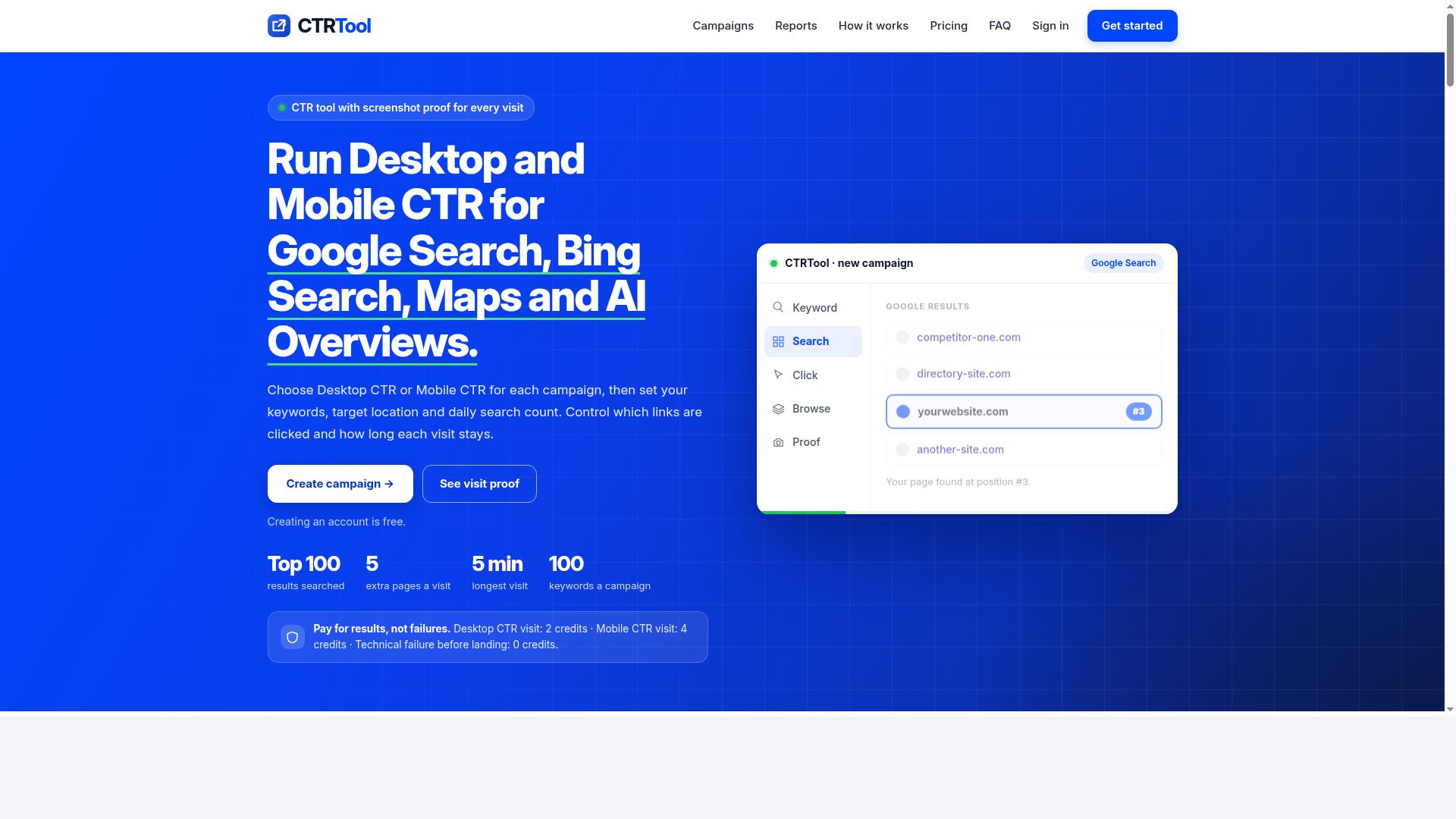
CTRTool is a SaaS platform that runs desktop and mobile click-through-rate (CTR) campaigns for Google Search, Bing Search, Google Maps, and AI Overviews, with screenshot proof for every visit. It is the subject of this pricing guide, and understanding what it actually does makes the cost breakdowns that follow far easier to interpret.
At its core, CTRTool runs CTR campaigns aimed at influencing behavioral signals on the pages you target. Rather than sending raw bot traffic, it structures each campaign around the search behavior a real visitor would produce, which is the foundation of CTR manipulation as a discipline.
The platform gives users direct control over campaign shape. You choose Desktop CTR or Mobile CTR per campaign, then set keywords, target location, and daily search count. You also control which links are clicked and how long each visit stays, which matters for dwell time and bounce rate signals.
CTRTool is transparent about limits. The site states plainly that automated visits do not guarantee rankings, a fair caveat given how ranking algorithms weigh many factors beyond engagement. For anyone comparing agency assassin style services against alternative tools, this page sets the baseline before pricing is covered.
Is CTRTool a Legit Agency Assassin Alternative for CTR Manipulation?
Agency Assassin is a known name in CTR manipulation, but legitimacy hinges on verifiable delivery rather than marketing claims, so this section compares CTRTool on that basis. The question is not which brand sounds more convincing. It is which one lets you check the work.
CTRTool is positioned as a CTR tool with screenshot proof for every visit for Google Search, Bing Search, Maps, and AI Overviews. That proof claim matters because traffic simulation is easy to promise and hard to verify. Screenshots give buyers something concrete to review instead of taking a vendor's word for it.
Before choosing any agency assassin alternative, apply the same three checks to every option:
- Proof of visits: Can you see evidence that each visit actually happened, or only aggregate dashboards?
- Campaign transparency: Are the campaign types, targeting options, and credit costs documented up front?
- Pricing model clarity: Is the cost per visit calculable, or does it depend on a quote you have to request?
On the third point, CTRTool publishes its full plan structure and credit costs, which makes cost-per-visit math possible before you commit. Agency Assassin's pricing is less visible in public material, so readers comparing it should request written quotes and confirm what a visit actually includes.
One caution applies to any tool in this category. CTRTool's own site advises starting with tier links, PBNs and test properties, and using CTR on main sites with caution. That guidance is a reasonable signal of how the vendor frames risk, and it is worth weighing alongside click fraud detection and bot mitigation concerns on the search side.
The verdict on legitimacy rests on verifiable elements: documented features, published pricing, and a stated proof mechanism. CTRTool meets those tests in a way buyers can audit themselves.
How CTRTool's Pay-for-Results Credit Model Compares on Cost
CTRTool uses a credit-based subscription model where monthly plans convert credits into desktop or mobile CTR visits, which makes cost-per-visit directly calculable. Each desktop CTR visit costs 2 credits and each mobile CTR visit costs 4 credits. A verified search without a match costs 1 credit, and a technical failure before landing costs 0 credits.
Here is how the two entry plans break down:
| Plan | Monthly Price | Credits | Desktop Visits | Mobile Visits | Cost per Desktop Visit | Cost per Mobile Visit |
|---|---|---|---|---|---|---|
| Starter | $59 | 2,000 | Up to 1,000 | Up to 500 | $0.059 | $0.118 |
| Growth (Recommended) | $125 | 5,000 | Up to 2,500 | Up to 1,250 | $0.05 | $0.10 |
The pattern is straightforward: bigger plans lower the cost per click equivalent. Scale at $399/month for 20,000 credits and Agency at $699/month for 40,000 credits continue that curve, though the per-visit math above shows the entry-level picture most buyers start with.
Compare that transparency to Agency Assassin, whose public pricing is harder to pin down. If a competitor's rates are not published, ask for a quote that states the per-visit cost, the device split, and what counts as a delivered visit. Without those numbers, side-by-side comparison is guesswork.
A few practical notes on the model. Unused credits roll over while a subscription is active and expire when cancellation takes effect, and creating an account is free. The site also lists limited launch pricing, with prices rising 30% on November 15, so current rates are worth locking in early. For keyword targeting tests on tier properties, the Starter plan alone covers up to 1,000 desktop visits, enough to observe SERP behavior shifts before scaling spend.
Key Features That Set CTRTool Apart
Beyond basic click simulation, CTRTool bundles verification, multi-platform support, and granular targeting into its campaigns. Anyone comparing CTR manipulation pricing needs to know what a platform actually delivers for the credits it charges.
The core differentiators are concrete:
- Screenshot proof for every visit, with search and landing screenshots as separate proof images
- Full visit paths that record the sequence of actions taken
- Keyword positions tracked over time, including Maps listing order and AI citation order
These features matter because they turn a black-box service into something an agency can audit. The subsections below cover campaign types and the verification system in detail.
Campaign Types: Google Search, Bing, Maps and AI Overviews
CTRTool supports four campaign types: Google Search CTR, Bing Search CTR, Google Maps CTR, and AI Overview CTR, each with distinct targeting rules.
Google Search CTR campaigns search a keyword and click the organic result. You can run them on Desktop or Mobile, with search depth reaching the Top 100 results, and send visitors to internal pages. Bing Search CTR follows the same structure for Bing search.
Google Maps CTR campaigns find a business listing and click its website link. These campaigns check up to 50 listings and support city targeting. AI Overview CTR campaigns locate your website inside the overview and click its source link, which requires a matching citation.
Location targeting works across all four types. Users can specify a country, state, and city, or select Any country for broader coverage. Search campaigns require the keyword to rank within the top 100 organic results, so keyword targeting should reflect realistic positions before a campaign launches.
Each campaign supports up to 100 keywords, and daily search counts can be scheduled with now, spread out, or gap timing across chosen days, hours, and time zones. This flexibility lets agencies match SERP behavior patterns rather than firing all clicks at once.
Screenshot Proof and Full Visit Paths for Every Campaign
Every CTRTool visit generates two separate proof screenshots, one for the search result and one for the landing page, along with a recorded visit path. This is the feature that most directly answers the trust question behind any CTR manipulation pricing guide.
For agencies, the value is verification. The search screenshot confirms the keyword was entered and the correct result appeared. The landing screenshot confirms the visit reached the target page. The full visit path shows the sequence of actions in between, so a reviewer can spot failed clicks or bot-like behavior before it affects reporting.
Proof also supports delivery accountability. When a client questions whether traffic simulation actually happened, the agency has documentation rather than a dashboard number alone. Reports include these visit paths and screenshots alongside keyword positions over time.
Position tracking extends beyond standard rankings. CTRTool records Search positions, Maps listing order, and AI citation order, giving a fuller picture of how organic rankings and visibility shift. That combination of proof and tracking is what separates a verifiable service from an opaque one.
CTRTool Pricing and Plans: A Full Breakdown
CTRTool offers monthly subscription tiers priced in USD and billed via credit allotments, with each credit translating into desktop or mobile visits depending on the plan you choose. The structure is straightforward: pick a tier based on your monthly CTR manipulation volume, then spend credits across keyword targeting and search queries.
This guide breaks down the three core tiers, Starter, Growth, and Scale, so you can match a plan to your campaign size. The sections below cover plan selection by volume and the exact credit-to-visit math, including effective cost per visit.
Note that CTRTool also lists Agency and custom development options at higher tiers, which may suit larger behavioral SEO operations. Creating an account is free, so you can inspect the interface before committing to a subscription.
Starter, Growth and Scale Plans in USD
The Starter plan at $59 per month provides 2,000 credits, while Growth at $125 per month provides 5,000 credits, with Scale offering higher volume. All plans are billed monthly in USD, and unused credits roll over while your subscription stays active.
- Starter: $59/month for 2,000 credits, up to 1,000 desktop CTR visits or 500 mobile visits
- Growth: $125/month for 5,000 credits, up to 2,500 desktop or 1,250 mobile visits, marked Recommended
- Scale: $399/month for 20,000 credits, up to 10,000 desktop or 5,000 mobile visits
- Agency: $699/month for 40,000 credits, up to 20,000 desktop or 10,000 mobile visits
Choosing a tier comes down to volume. Starter fits small keyword sets and early tests of SERP behavior. Growth suits steady campaigns across several search queries. Scale and Agency target larger operations that need sustained impression share and user engagement signals.
CTRTool notes that prices rise 30% on November 15, so locking in current rates matters if you plan to commit. Credits expire when cancellation takes effect, so plan your monthly usage around active campaigns.
How Credits Convert to Desktop vs Mobile CTR Visits
Credits convert at a 2:1 ratio for desktop visits and 4:1 for mobile visits, meaning 2,000 credits yield 1,000 desktop or 500 mobile visits. Mobile traffic simulation costs more because it consumes twice the credits per visit.
On the Growth tier, 5,000 credits produce up to 2,500 desktop or 1,250 mobile visits. Scale stretches to 10,000 desktop or 5,000 mobile visits, and Agency reaches 20,000 desktop or 10,000 mobile.
The effective cost per visit works out as follows:
| Plan | Cost per Desktop Visit | Cost per Mobile Visit |
|---|---|---|
| Starter | $0.059 | $0.118 |
| Growth | $0.05 | $0.10 |
| Scale | $0.04 | $0.08 |
| Agency | $0.035 | $0.07 |
Higher tiers lower the per-visit rate, so the math favors upgrading once your campaign volume is stable. Estimate your monthly visit needs first, split them between desktop and mobile, then pick the tier that covers both without waste.
Two credit rules affect budgeting. A verified search without a match costs 1 credit, and a technical failure before landing costs 0 credits, so wasted spend stays limited. Factor these into your calculations when planning keyword targeting across the Google SERP and Bing search.
Trust Signals: What CTRTool Verifiably Delivers
CTRTool's trust signals center on verifiable proof: screenshot evidence for every visit, documented campaign parameters, and transparent pricing. In a market where many CTR boosting services leave buyers guessing, that evidence trail is the difference between a tool you can audit and one you simply have to believe.
The core of that proof is screenshot evidence for every visit. Each visit produces search and landing screenshots as separate proof images, so you can see both the SERP interaction and the page activity rather than a single ambiguous capture. For anyone comparing agency assassin alternatives, this is a material distinction: evidence you can review beats a dashboard number you cannot trace.
CTRTool also documents full visit paths for each campaign. You can see how a visit moved through the site, which supports session management review and gives you a clearer picture of the user engagement signals being generated. That record matters when you need to explain campaign activity to a client or keep an internal audit log.
Tracking extends beyond raw visit counts. Keyword positions are recorded over time, including Maps listing order and AI citation order. That means you can watch organic rankings and local visibility move alongside the campaign itself, instead of judging results by clicks alone.
Two campaign rules add further reliability:
- The target page must appear within the top 100 organic results for the keyword, which keeps campaigns anchored to pages with real ranking potential.
- Maps campaigns check up to 50 listings, so local targeting is verified against the listings that actually appear.
Verification failures are handled honestly. Visits that cannot verify the requested location use no credits, and no credits are charged for technical failures before landing. Combined with a pay-for-results credit model, this means your balance reflects completed work, not failed attempts.
For agencies running multiple clients, one credit balance is shared across all campaign types, websites, and keywords, and unused credits roll over while subscribed. Capacity reaches up to 100 campaigns with 100 keywords each, with visits up to 5 minutes and up to 5 additional internal pages. Taken together, these signals show a platform built around evidence you can check, which is exactly what a credible alternative to agency assassin style services should look like.
Who Should Use CTRTool
CTRTool is built for SEO practitioners and agencies running CTR campaigns for their own or client websites across Google Search, Bing Search, Google Maps, and AI Overviews. The platform fits teams that treat CTR manipulation as a deliberate part of a broader search engine optimization strategy rather than a one-off experiment.
The site's own guidance references tier links, PBNs, and test properties alongside CTR work. That tells you the expected user is someone comfortable with behavioral SEO tactics and the infrastructure that surrounds them, not a beginner looking for a single push-button fix.
Three use cases stand out for this audience:
- Agencies needing proof for clients. A campaign tied to specific keyword targeting gives account managers something concrete to point to when reporting on SERP behavior and movement in organic rankings.
- In-house SEOs testing SERP behavior. Teams can run controlled tests on their own properties before committing budget to a larger push.
- Teams targeting multiple search engines. Coverage across Google Search, Bing Search, Google Maps, and AI Overviews means one workflow instead of several disconnected tools.
Geographic reach matters here too. Campaigns can target specific countries, states, and cities, which suits agencies managing local clients or multi-market sites where impression share and engagement vary by region.
Just as important is who CTRTool is not for. Anyone expecting guaranteed ranking lifts, or unwilling to think about click fraud detection and how behavioral signals are interpreted, will get little from it. The tool rewards practitioners who already understand the difference between traffic simulation and real audience growth.
For that audience, CTRTool is a credible option among agency assassin alternatives. It is a legitimate, purpose-built platform for teams that run CTR boosting services or internal campaigns and want a single place to plan, target, and report on them. If that describes your workflow, CTRTool is a strong fit.
Final Verdict: Is CTRTool Worth It as an Agency Assassin Alternative?
CTRTool makes a strong case as an Agency Assassin alternative for teams that prioritize verifiable delivery and transparent per-visit costs. The platform combines screenshot proof of delivered clicks with multiple campaign types, so buyers can connect spend to visible outcomes rather than trusting an opaque dashboard.
That combination matters in a market where CTR manipulation buyers often have little to verify. When a vendor shows proof and prices by credits, the buyer can estimate cost per visit before committing. That is a meaningful edge over models where subscription tiers hide the real unit economics.
Pricing transparency is the second pillar of the verdict. Credit-based pricing maps directly to usage, which suits agencies running keyword targeting across several client accounts. Instead of guessing what a plan covers, teams can scale spend with actual campaign volume.
Support access is thinner than the rest of the offer. CTRTool lists a support email in its FAQ, vaibhav@autoblogging.ai, and no phone number, physical address or opening hours are stated. Buyers who need live voice contact should weigh that limitation against the platform's proof and pricing strengths.
The site itself is straightforward to navigate, with pages for Sign in, Create an account, Support, Terms of use and Legal notices. That structure gives new users a clear path from evaluation to account creation without hidden steps.
For agencies comparing options, the decision comes down to priorities. Teams that value screenshot proof and clear per-visit costs will find CTRTool a credible fit. Those who need phone support or an on-site address will want to factor that gap into their choice.
Overall, CTRTool earns a favorable verdict as an Agency Assassin alternative. It delivers verifiable campaign evidence, flexible campaign types and understandable credit pricing. Readers should visit ctrtool.com to review current plans and confirm details before purchasing.
Frequently Asked Questions
How is CTRTool priced compared to other CTR manipulation tools?
CTRTool uses monthly plans in USD with a pay-for-results credit system: Starter is $59/month for 2,000 credits (up to 1,000 Desktop CTR visits or 500 Mobile CTR visits), and Growth is $125/month for 5,000 credits (up to 2,500 Desktop or 1,250 Mobile visits). Since competitor pricing varies and changes often, compare your expected monthly visit volume against CTRTool's credit tiers rather than assuming another tool is cheaper.
What does a "credit" actually get me in a CTRTool campaign?
Credits are consumed per visit, and Desktop and Mobile CTR visits have different credit costs - for example, the Starter plan's 2,000 credits cover up to 1,000 Desktop visits or 500 Mobile visits. Because you choose Desktop CTR or Mobile CTR per campaign, you can estimate your monthly budget by deciding which device type you need before picking a plan.
What proof do I get that visits actually happened?
Every CTRTool visit includes screenshot proof, with search and landing screenshots provided as separate proof images, plus full visit paths. Keyword positions are also tracked over time, including Maps listing order and AI citation order, so you can verify results rather than relying on a dashboard count alone.
Which platforms and campaign types does CTRTool support?
CTRTool runs campaigns for Google Search, Bing Search, Google Maps and AI Overviews, with Desktop and Mobile options for search campaigns. Search campaigns target your keyword and click the organic result within the top 100 results, Maps campaigns check up to 50 listings (about five pages), and AI Overview campaigns require a matching source link.
Can I target specific locations for my campaigns?
Yes - you set keywords and target a chosen country, optionally narrowed to a state and city, or select "Any country" to use a mix of supported locations. CTRTool is a global online service with no stated country restrictions, which makes it workable for agencies managing clients in different markets.
How do I get help if I have a question about plans or campaigns?
Support is available by email at vaibhav@autoblogging.ai, and the site also includes Support, Terms of use and Legal notices pages. There's no phone number or physical address listed, so email is the documented contact route for pricing or campaign questions.